What is a Multi-Cloud Strategy?
Multi-cloud refers to the practice of using cloud services from multiple providers within a single architecture or environment. Rather than relying on just one cloud provider, businesses combine public, private, or hybrid cloud solutions to enhance performance, improve cost-efficiency, increase reliability, and provide greater flexibility.
According to the Flexera 2024 State of the Cloud Report, 79% of organizations are either currently using or planning to use multi-cloud deployments.
Multi-cloud strategy allows organizations to:
- Optimize costs by selecting the most affordable cloud provider for specific workloads or services, ensuring efficient resource utilization.
- Enhance flexibility by taking advantage of the unique capabilities of various cloud providers to meet diverse application and infrastructure needs.
- Increase resilience by distributing workloads across multiple cloud platforms, minimizing the risk of disruptions from any single provider.
- Place workloads closer to end-users by utilizing geographically dispersed cloud infrastructure to reduce latency and improve performance.
- Meet data sovereignty and regulatory requirements by choosing cloud providers with data centers in specific regions to comply with local laws.
- Access a wider range of tools, technologies, and services offered by different providers, fostering innovation and enabling businesses to leverage the best available solutions.
- Implement robust disaster recovery solutions by utilizing multiple cloud providers for backup and failover, ensuring data continuity in case of an emergency.
In conclusion, for large organizations with specific needs and a sophisticated IT strategy, multi-cloud becomes a crucial tool to optimize resources, enhance security, and reduce dependency on a single provider while ensuring flexibility and minimizing risks.
Concrete benefits of chatbots for your business
Chatbots enable your customers and teams to find or input information instantly — via text or voice — without human intervention. Here are the key benefits:
- Availability 24/7, including outside working hours.
- Reduced operational costs by automating repetitive, low-value tasks.
- Improved customer experience through immediate, personalized responses.
- Freed-up team capacity to focus on higher-value work.
- Multichannel accessibility: website, Teams, Slack, SMS, and more.
- Actionable behavioral analytics to better understand your users.
- Continuous learning via machine learning for steadily improving performance.
- Communicate in your users' language — whether written or spoken.
Chatbots play a key role in digital transformation: they improve efficiency, reduce costs and enhance the user experience.
To get the most out of one on your cloud environments, the assistant must respect everyone's rights, change nothing without agreement, and fit into your teams' tools.
CloudOps Move2Cloud
Overview
CloudOps Move2Cloud is a SaaS application hosted in France. Each organisation connects its cloud accounts (OVHcloud, Scalingo, Scaleway, AWS, Azure or Google Cloud) with an access created for the assistant: read only, or with the change rights it chooses.
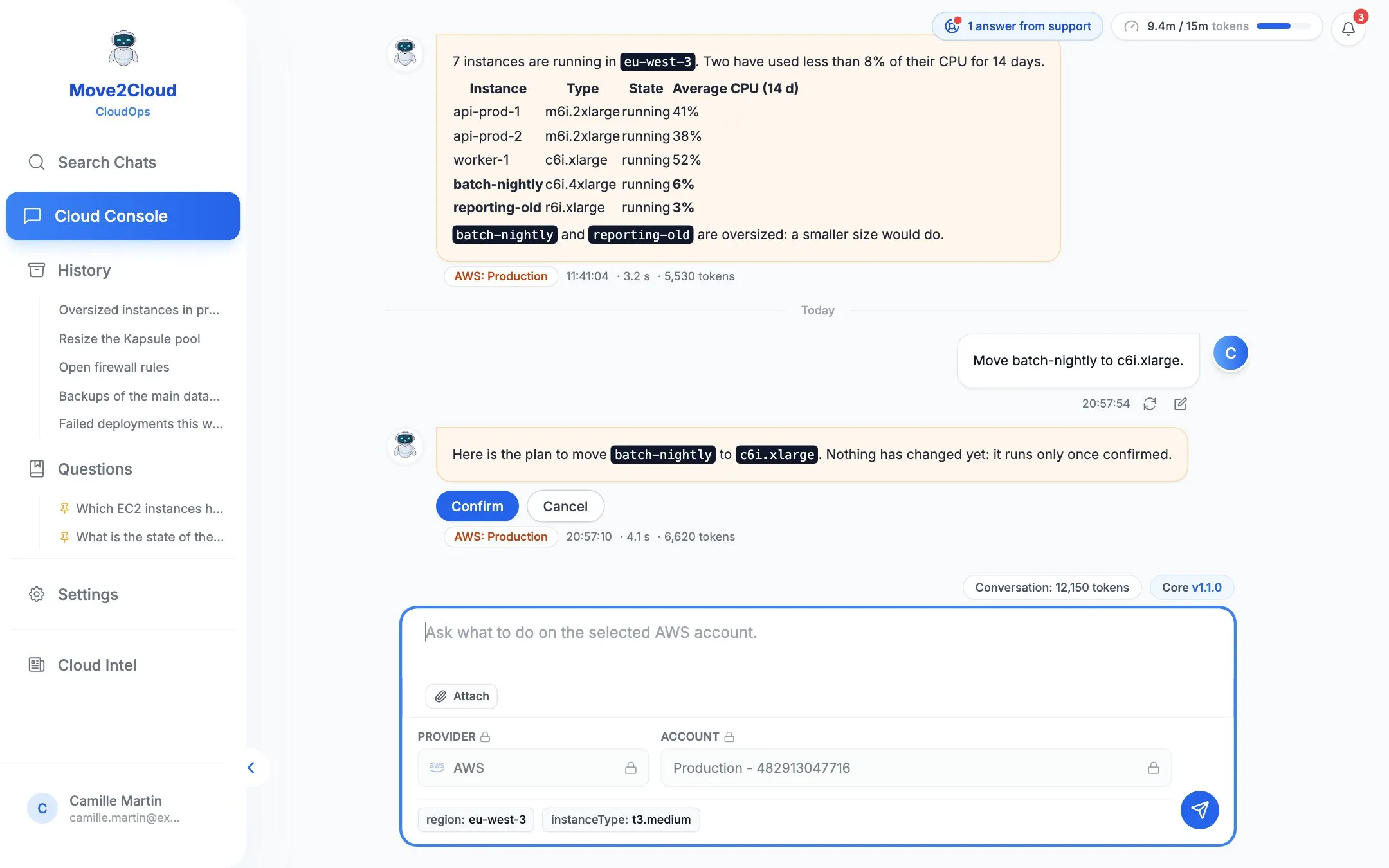
The assistant answers questions from the account itself. For a change, it prepares a plan with its steps and its risk: nothing runs before confirmation, and an administrator can require approving the operators' changes.
Your teams use it from:
- The web console, in French and in English
- Slack — coming soon
- Microsoft Teams — coming soon
High-Level Architecture
The following illustration shows the parts of CloudOps Move2Cloud and how it works with your cloud accounts.
Key features of CloudOps Move2Cloud
CloudOps Move2Cloud gives you what you need to operate your cloud accounts as a team, while staying in control:
Questions in plain language
Ask a question about a cloud account: the assistant reads the account itself to answer — resources, configurations, states.
Six cloud providers
OVHcloud, Scalingo, Scaleway, AWS, Azure and Google Cloud, each in its own conversation, with several accounts per provider if needed.
A plan before any change
A change is first shown as a plan, with its steps and its risk. Nothing runs before you confirm.
Approval by an administrator
An approval rule can require an administrator to approve the changes prepared by operators before they run.
Team and roles
Administrator, operator, reader: each does what their role allows. A reader asks questions without any change being prepared.
Shared or reserved accounts
Each cloud account is shared with the whole team, or kept to its administrators.
Attachments and history
Attach a screenshot or a text file to a question; your conversations and saved questions stay in the history.
Sovereignty and security
Application and data hosted in France, cloud credentials encrypted and never shown again, sign-in with a Move2Cloud account and two-factor authentication.